FlowchartAI for developers
A flowchart API for diagrams you can keep editing.
Turn process descriptions into saved, editable draw.io diagrams. Generate from your app, change a branch with another request, then open the same file to finish it by hand.
Uses your existing FlowchartAI allowance. Set a maximum for each AI request.
curl https://flowchartai.org/api/v1/generations \
  -H "Authorization: Bearer $FLOWCHART_API_KEY" \
  -H 'Content-Type: application/json' \
  -H 'Idempotency-Key: onboarding-001' \
  -d '{
    "prompt": "Map signup, email verification and activation, including a resend email branch.",
    "max_credits": 100
}'From a description to a working file
One request. A diagram your team can change.
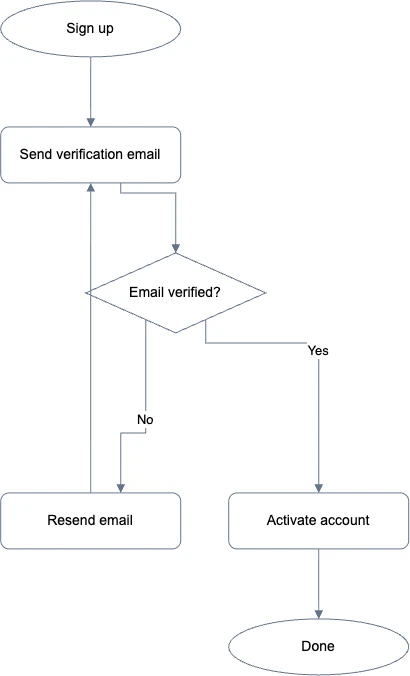
The onboarding example maps signup, email verification, an resend-email branch and activation. Its output is a native document with separate shapes and connectors. You can rename a step, restyle a decision or move a branch in the editor.
The response includes the saved diagram ID, a version hash and an editor link. Keep those with your source material so the next revision has a clear starting point.
Build diagram creation into the work you already do
Product documentation
Turn a written feature brief into a first process map. Keep the API response with the brief, review the decisions with a teammate, and carry approved changes into the same editable file.
Operations playbooks
Convert a checklist into a flow with owners, handoffs and exception paths. When a procedure changes, send the current file and the requested change instead of rebuilding the diagram from scratch.
Agent-assisted development
Give a script or coding assistant a diagram task alongside a ticket. Save the result in your account and use its editor URL in the handoff. People can inspect the actual document before making the next change.
Revise the process without losing the current file
Read a saved diagram, then describe the change: “Add a welcome email after activation” or “Send an expired link back to verification.” A natural-language edit starts from the existing native document.
Every edit includes the file's current version. If someone has saved a newer copy on the website, the API asks you to read it again before applying changes. API and MCP saves capture versions you can inspect later.
Choose the output your next step needs
- Editable draw.io file
- Download native XML for continued diagram editing.
- Native JSON document
- Read and save the document, revision and diagram type in your integration.
- PNG and SVG from the editor
- Follow the returned editor link to render an image for a document, deck or review.
Put a budget around automation
Each AI request carries a credit maximum. Charges use the complete task's model usage and stay within the accepted reservation. Failed delivery and platform corrections do not add another user charge. Manual saves, reads and exports are free of AI charges.
Set account and key daily budgets in one dashboard, review recent task receipts and revoke unused credentials. Your current Credits or eligible legacy subscription allowance continues to apply.
Flowchart API questions
Can I generate a flowchart from an image?+
Yes. Include one PNG, JPEG or WebP as a base64 data URI with your prompt. The decoded image must be no larger than 2 MB. This works best with a legible diagram or screenshot. The API returns editable native shapes, so review the recognized labels and branches before sharing it.
What happens if a request times out?+
Each write has an idempotency key. Repeat the same request and key, or read its task receipt, to find the existing result. A duplicate does not start another generation. A prepared result can finish saving without a new model call. Check the terminal receipt before starting a fresh operation.
Can I use Python or JavaScript?+
Yes. This is a standard JSON-over-HTTPS REST API with a downloadable OpenAPI specification. Any language with an HTTP client can authenticate, generate diagrams and download files. The Quickstart uses cURL and jq so you can verify the workflow before adding it to your own application.
How do I protect a production API key?+
Keep the key on your server, give it only the permissions it needs, and set an expiry and daily budget. The complete secret is displayed once. Rotate it from the dashboard when replacing credentials, or revoke it to stop access immediately. An API key cannot create a website login session.
Can an assistant use the same diagrams through MCP?+
Yes. The remote MCP endpoint uses the same account, saved files and task services. OAuth clients request your permission through FlowchartAI; clients with custom headers can use a scoped key. Open the MCP connection page for the correct setup for your client.
Try one process from your own workflow
Start with a scoped key and a small, specific description.